Everyday clinical work
Group documentation · Individual clinical notes · Case management · Family and collateral documentation
 Perception of LifeJunior Pemberton, LCSW
PLRM Clinical Tools
Documentation Assistant asks for what matters, organizes what you provide, and gives you a structured draft to review and copy into the EHR. Complete Tools adds Group Builder and saved group storage.
Complete Tools $10/month for the first 3 months, then $30/month · Documentation Assistant $19/month
Why this exists
The hard part should be professional judgment, not reconstructing the same information from memory across disconnected screens. PLRM gives that work a clearer starting point while leaving the final decision with you.
395Ready-to-print worksheets
Search by what your client is facing: cravings, shame, grief, boundaries, anger. Preview it, print it, or bundle several into one packet. Written by a working LCSW to hit hard and go deep, not to fill time. Included with Complete Tools.
How Documentation Assistant works
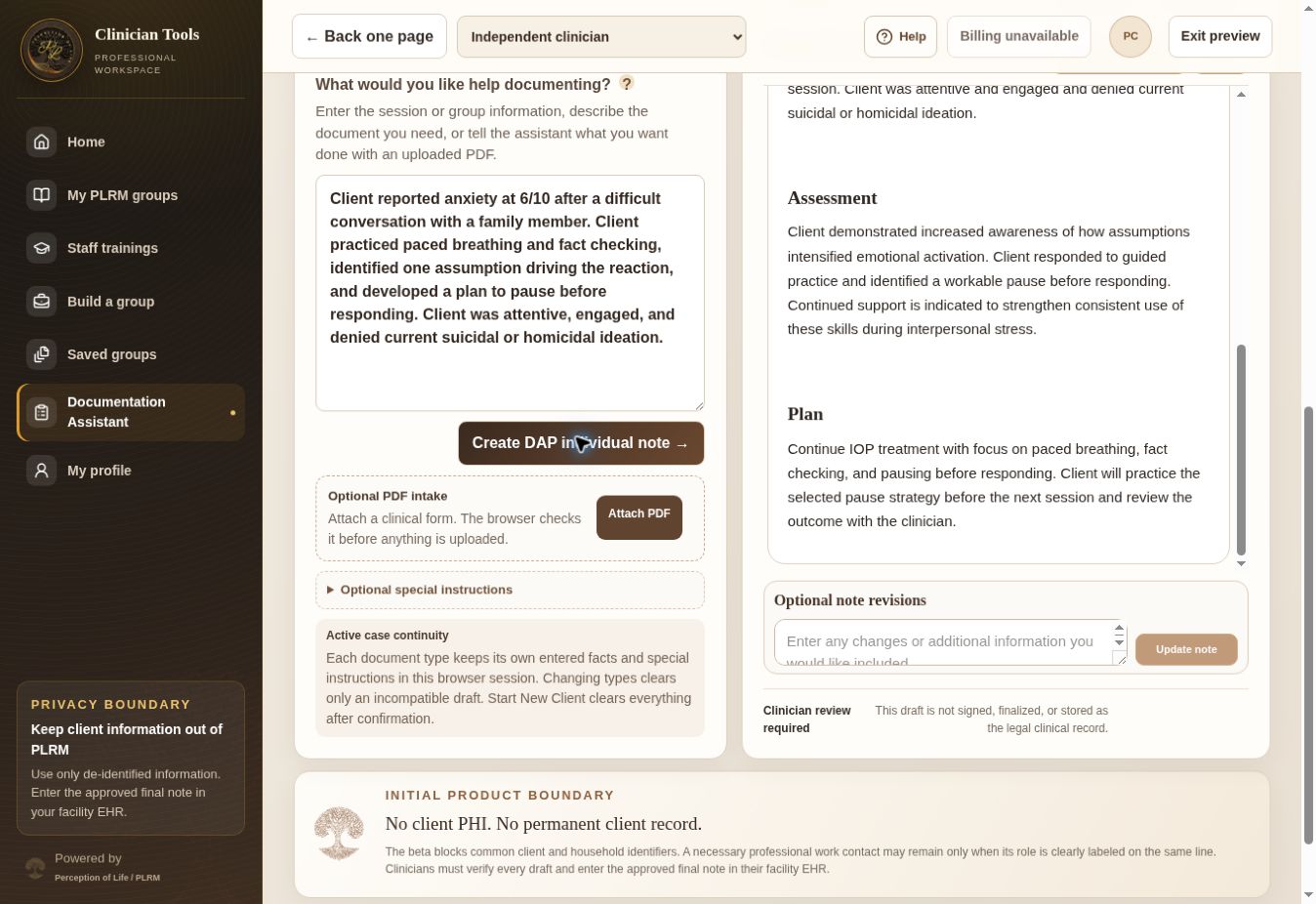
Describe the work, answer the meaningful gaps, then review what belongs in the record.
Start with the clinical details you already know.
Fill the gaps needed for a more complete starting draft.
Correct the language and decide what belongs in the record.
One assistant, many kinds of writing
You don’t pick a separate tool for each document. Paste your notes, quick shorthand, or de-identified sections of a form, and say what it’s for. The assistant writes it in clinical language from what you gave it, without adding facts you didn’t supply. You read it, fix anything, and copy it into your EHR.
Built for therapists, case managers, intake and assessment specialists, peer support professionals, group facilitators, clinical leaders, and others documenting care within their role.
Group documentation · Individual clinical notes · Case management · Family and collateral documentation
Cleaning up shorthand in BPS sections (not a full BPS) · Treatment plan wording · Risk and safety wording from your findings
Continued stay (CCR) and UR paragraphs · Level-of-care wording · Discharge and aftercare wording from your facts
Staffing or clinical updates · Note QA and documentation review
Note QA
Paste a de-identified existing note and review it through the eyes of a clinician, clinical director, or documentation reviewer. Note QA doesn’t just score the writing. It shows what’s supported, what’s unclear, and what should be corrected before the note is returned to the record.
Case management, made clinically meaningful
“Called probation officer and sober living. Confirmed appointment and transportation.”
How did the identified barriers affect treatment access, recovery stability, or risk?
A review-ready CM note connects the coordination work to the documented barrier, its effect on continued treatment access or recovery stability, the outcome, and the next step without adding facts the case manager didn’t provide.
Fictional example. The assistant asks for the missing clinical connection rather than inventing it.
Documentation Assistant
Use natural input and focused follow-up questions to create review-ready drafts across the documentation cycle. The assistant organizes the details without taking professional judgment away from the person responsible for the record.
In development
The upcoming browser extension is being built to help users call PLRM from their browser, identify the section in front of them, and prepare a draft for review without depending on a separate template for every major EHR.
The extension isn’t available yet. Privacy, permissions, and EHR compatibility remain part of development.
Complete Tools
Group Builder creates more than a topic and worksheet. It can prepare the teaching, participant work, facilitation structure, and documentation support needed to run a substantial clinical group, then save the packet for later use. When the group is complete, carry the planned group context into Documentation Assistant so the shared note and individualized client drafts begin from the group that was actually facilitated.
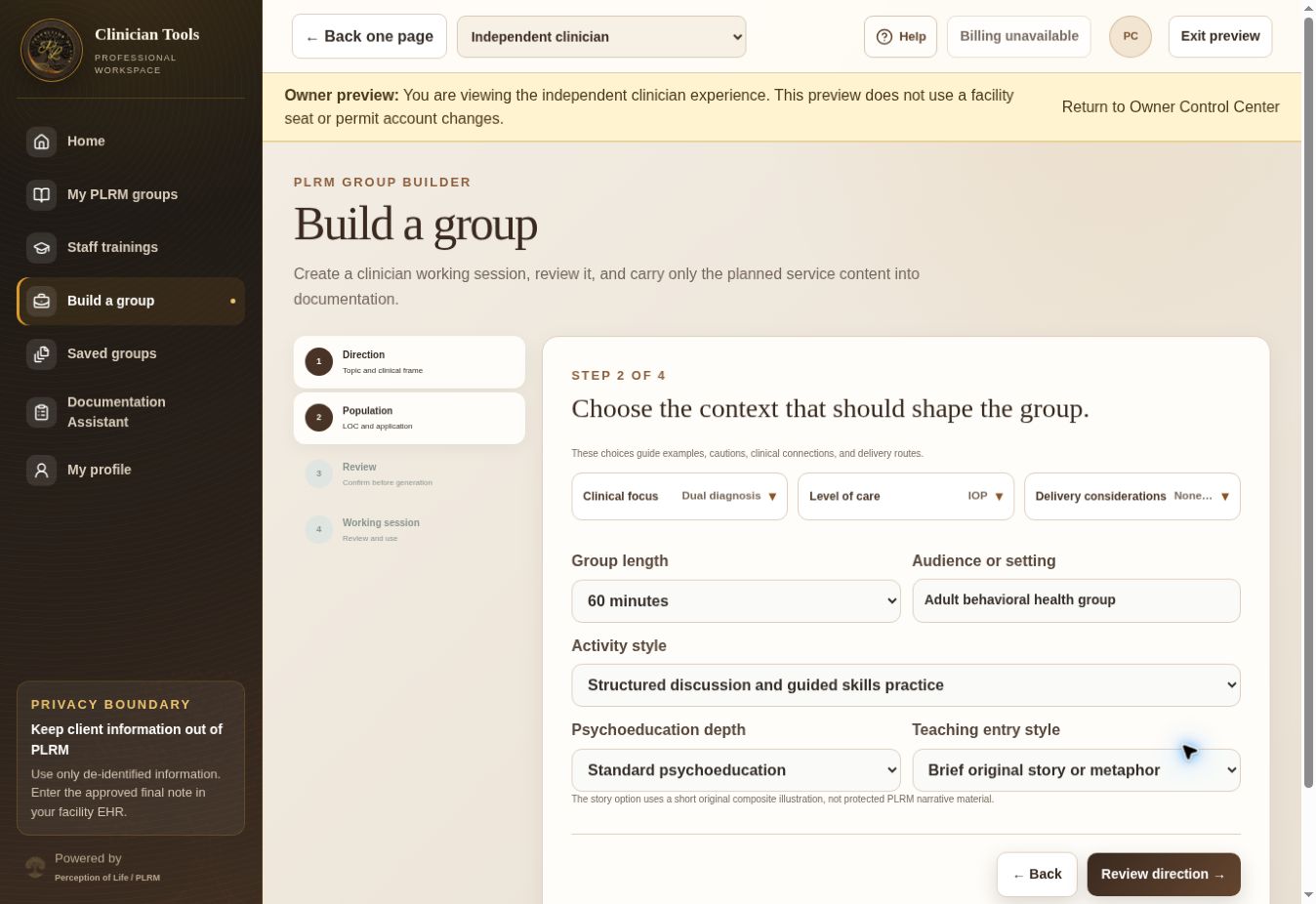
See the actual workflow
Each short video uses the real portal interface and fictional information.
Group Builder into documentation
See the topic and clinical setup become a substantial group packet, then follow the planned content into Documentation Assistant for the shared note and individualized client drafts.
What happens when the facts aren’t there
When clinically important information is missing, especially around risk or safety, the assistant stops and asks instead of turning the gap into a negative finding. Group documentation can create a shared group note and genuinely individualized client notes, but it doesn’t fabricate participation, response, progress, risk, or other client-specific facts.
Don’t enter PHI. Every draft requires professional review, and the finished clinical record stays in the facility EHR rather than becoming the portal’s clinical chart.
Choose your subscription
Create or sign in to your protected portal account, complete the professional use acknowledgments, choose your plan, and continue to secure Stripe checkout.
Documentation Assistant
Introductory price
Both plan buttons open secure PLRM account setup at portal.perception-of-life.com. You’ll complete the professional-use acknowledgments before checkout.
Subscriptions renew monthly until canceled. Cancellation takes effect at the end of the current paid period. Applicable tax is added at checkout. PLRM remains a beta service. The current tools are available now, while features and workflows may continue to improve. Material pricing changes will be disclosed before they take effect.
Read complete subscription termsClinical and privacy boundary
PLRM supports professionals working in behavioral health who create or assist with clinical documentation. Don’t enter names, dates of birth, record numbers, or other protected health information. Every draft is yours to review, correct, and approve before it reaches the record. When required, an authorized clinician or supervisor must also review it. PLRM helps capture medical necessity, interventions, response, risk, progress, barriers, and level of care factors that payers evaluate. It doesn’t guarantee authorization or payment, and it doesn’t replace professional judgment, supervision, emergency procedures, organizational policy, or legal responsibility.
Questions before subscribing? Email Junior directly.